

DCI alignment pattern
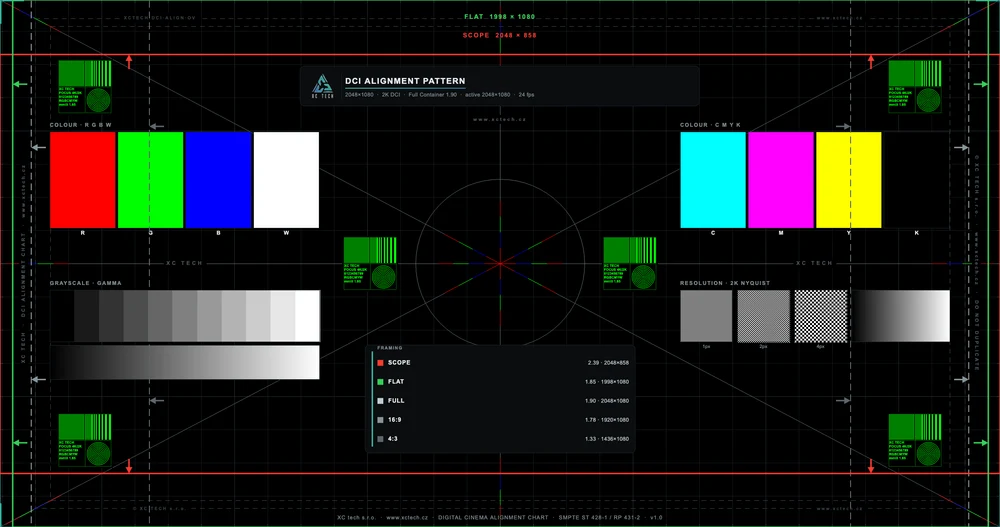
Geometry, convergence, sharpness and colour channels in one chart, with Flat, Scope, F-200 and F-220 framing lines. Full container, 20 s @ 24 fps.
Files and SHA-256
- 2K · XctechDCIAlign_2K_Full_SMPTE_OV.zip · 469 MB
SHA-256 b5b86b33429d7c4bed634275f7238823d99c1ab26eb63e879bef67009bf4fcbe - 4K · XctechDCIAlign_4K_Full_SMPTE_OV.zip · 446 MB
SHA-256 8d7771a1a48c7de7d4500ad573faae79f2bcaec58b6797262318f62457edb87b
What the package contains
- Format frames
- Scope 2.39 (2048 × 858), Flat 1.85 (1998 × 1080), F-200 (1998 × 1000), F-220 (1998 × 908), Full 1.90 (2048 × 1080), 16:9 (1920 × 1080) and 4:3 (1436 × 1080), each labelled; doubled in 4K except F-200, which is 3996 × 1998. For masking and preset checks.
- Masking arrows
- On the picture edges for Flat, Scope, F-200 and F-220: where the masking should land and where the preset picture ends.
- Grid and centre
- A 1 px grid across the whole picture, a centre cross with a circle and R, G, B lines: geometry, cropping and convergence.
- Focus and convergence at the edges
- Targets in the corners and on the edges, because defocus and channel misregistration show first at the edges of the chip.
- Colour fields
- R, G, B, W and C, M, Y, K: a functional check that every channel lights and white is neutral. The chart is not colorimetric and does not measure colour.
- Grey scale
- A stepped scale and a continuous ramp: gamma and visible banding.
- Resolution
- 1 px, 2 px and 4 px checkerboards (Nyquist): tell native 2K or 4K from scaling; in the 4K package the 1 px lines really are 1 px.
- On-chart labels
- Resolution, container, active area and 24 fps inside the picture; the text doubles as a focus aid.
How to use the test
- 1
Download the version that matches the native resolution of the projector: 2K for a 2K projector, 4K for a 4K one.
- 2
Ingest the package into the cinema server and play it. The chart is in the Full container, so it lights the whole projector chip.
- 3
Geometry and masking: the edge of the preset picture should sit exactly on the Flat (1998 × 1080) or Scope (2048 × 858) frame. The arrows on the edges show where the masking should land.
- 4
Focus and convergence: check the targets in the corners and on the edges and the 1 px grid. Defocus and channel misregistration show first at the edges of the chip.
- 5
Resolution: the 1 px checkerboard must be sharp. If it blurs, the projector is scaling the picture.
- 6
Colour: the R, G, B, W and C, M, Y, K fields are a functional check that every channel lights and white is neutral. The chart does not measure colour.
Technical parameters
- Container
- Full 1.90:1 · 2K 2048 × 1080 · 4K 4096 × 2160
- Duration
- 20 s at 24 fps (480 frames), still frame
- Bit rate
- 200 Mbit/s
- Audio
- silent track in MXF
- Authored with
- DCP-o-matic 2.18 from a native-resolution master
- Standard
- SMPTE DCP, unencrypted (no KDM), content kind TST
- Picture
- JPEG 2000 in MXF, X'Y'Z' 12 bit, gamma 2.6 (SMPTE ST 428-1)
- Package
- ASSETMAP, CPL, PKL, VOLINDEX and MXF in a folder ending in _SMPTE_OV, zipped
Versions
- v2.0 (2026-09-11)
- F-200 (1998 × 1000) and F-220 (1998 × 908) DCNC framing lines, 3996 × 1998 and 3996 × 1816 in 4K.
- Masking arrows on the edges and a legend row for every format.
- 4K: convergence lines are exactly 1 px.
- v1.0 (2026-06-26)
- First public release: 2K and 4K Full container, Flat and Scope frames, convergence, focus, channels.
All releases: GitHub Releases · Free for projector alignment, commercial use included, under the licence CC BY-ND 4.0
Frequently asked questions
Where on the chart do I check focus and convergence?
On the targets in the corners and on the edges and on the 1 px grid across the picture. Defocus and R, G, B misregistration show first at the edges of the chip, which is why the targets sit there. The centre cross with a circle and R, G, B lines shows convergence in the middle.
How do I tell that the projector is scaling the picture?
From the 1 px, 2 px and 4 px checkerboards. In native display even the 1 px checkerboard is sharp; when the projector scales the picture, the finest pattern blurs. So play the 2K version on a 2K projector and the 4K version on a 4K one.
Can I measure colour or brightness with the chart?
No. The R, G, B, W and C, M, Y, K fields are a functional check that every channel lights and white is neutral. The chart is not colorimetric; calibrating colour and brightness needs a measuring instrument.
More test DCPs
Something not working?