The 7.1 channels play one after another: first the channel name is spoken, then six seconds of pink noise. Checks the wiring of all eight channels, rear ones included. Flat container, 1:12.
Shows whether the sound in the auditorium runs ahead of or behind the picture, and by how many milliseconds. Two packages: Classic with countdown, offset finder from -100 to +100 ms, clapperboard and channel check (1:03), and Sync Highway, where notes land in 15 lanes one frame apart and lane 0 clicks (1:26). Flat container.
Ten music worlds mixed across every channel of 5.1 or 7.1. A 3D auditorium shows which speakers play and where the sound moves, and every track opens with the sound going round the room speaker by speaker. Flat container, 8:20.
All packages are unencrypted (no KDM) and ready to ingest into the cinema server right away.
// HOW TO
How to use the package
1
Download the ZIP and unpack it.
2
Ingest the folder ending in _SMPTE_OV into the cinema server over USB or the network. The packages are unencrypted, no KDM needed.
3
Add the package to a playlist and play it. With the charts check geometry, masking, focus and colour; with the 7.1 test listen whether every channel plays from the right speaker.
Any DCI server. The package is a standard SMPTE DCP, unencrypted, so no KDM is needed. The unpacked ZIP contains a folder ending in _SMPTE_OV; ingest it over USB or the network like any feature and add it to a playlist.
Should I use the 2K or the 4K version?
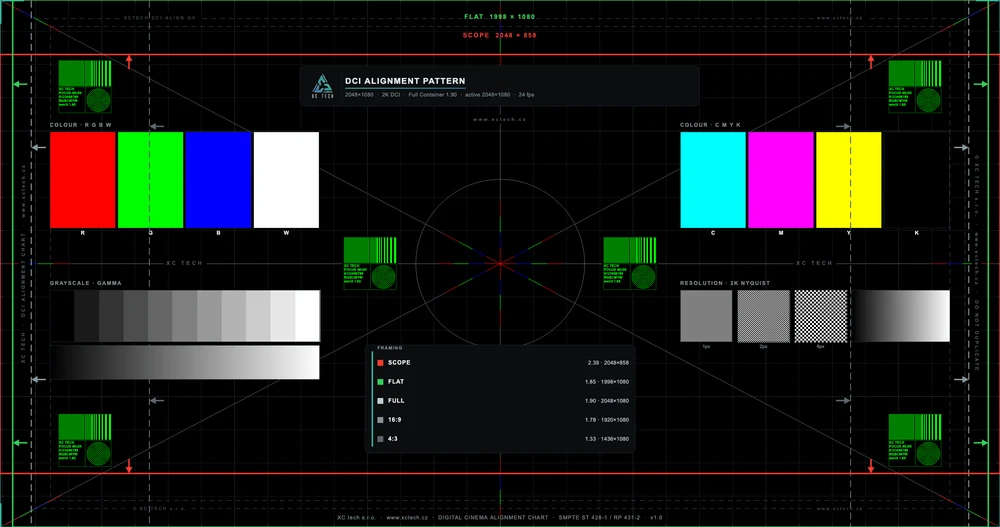
Match the native resolution of the projector. The chart carries 1 px, 2 px and 4 px checkerboards that tell native display from scaling: the 4K package on a 2K projector is downscaled by the server and the 1 px pattern blurs, the 2K package on a 4K projector shows the upscale. The content of both versions is otherwise identical.
Why is the chart in the Full container and how do I set Flat and Scope masking with it?
The Full container (1.90:1) lights the whole chip, so one package checks every format. The Flat (1998 × 1080) and Scope (2048 × 858) frames and the edge arrows show where the masking should land and where the picture of each preset must end. A preset is right when the picture edge sits exactly on its frame.
What are the F-200 and F-220 lines?
Aspect ratio codes from the Digital Cinema Naming Convention (DCNC): a 2.00:1 and a 2.20:1 picture delivered in the Flat container, i.e. letterboxed. In 2K that is 1998 × 1000 px and 1998 × 908 px, in 4K 3996 × 1998 px and 3996 × 1816 px. They serve content that is neither 1.85 nor 2.39. The DCP aspect ratio calculator shows how such a picture fits the containers.
What are the F-190 and F-210 lines and when do I need the framing package?
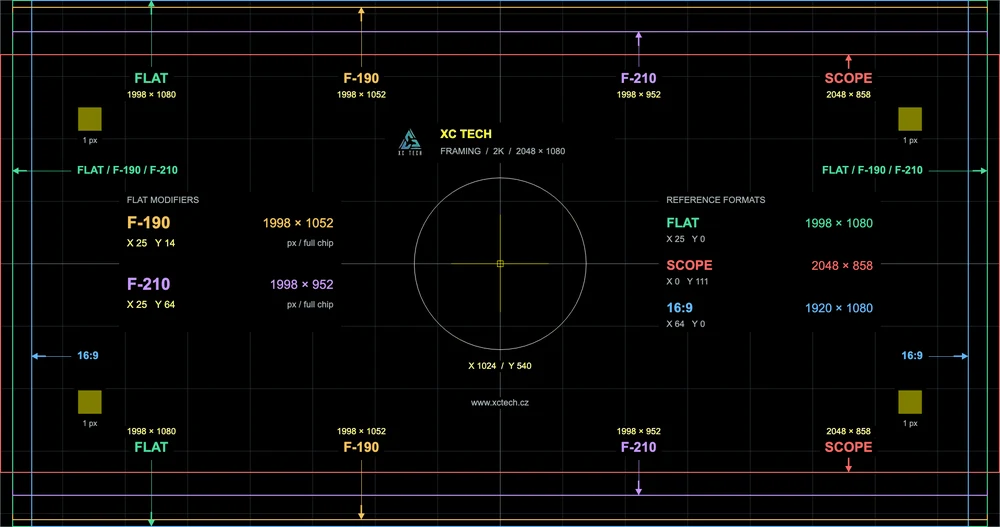
F-190 and F-210 are 1.90:1 and 2.10:1 pictures delivered in the Flat container: 1998 × 1052 px and 1998 × 952 px in 2K, 3996 × 2104 px and 3996 × 1902 px in 4K. The framing package shows them together with Flat, Scope and 16:9 and gives the pixel offset of every line, so you can set the preset and masking for content in these formats.
What does the 7.1 channel test contain and how do I use it?
The channels play one after another in the order L, C, R, LFE, Ls, Rs, Bsl, Bsr: first the channel name is spoken, then 6 s of pink noise at -20 dBFS RMS (LFE band-limited to 30 to 120 Hz). The screen shows an auditorium model with the speaker that should be playing highlighted. If the sound comes from somewhere else than the picture shows, the channel is wired or mapped wrongly. The package has 16 channels in the 7.1 DS layout (ISDCF Doc4), so it also checks the rear channels on positions 11 and 12.
How do I find out whether the sound runs ahead of the picture?
Play the sync test and watch it from the reference seat, about two-thirds back. In the offset finder pick the pair where flash and beep feel exactly together. If +40 ms looks right, the sound comes 40 ms early and the processor needs 40 ms more audio delay. If -40 ms looks right, the sound comes late and the delay should be reduced. Do not measure with the web preview: the browser and headphones add their own delay.
How long does the package play and does it have sound?
It is a still frame lasting 20 s at 24 fps (480 frames). For longer alignment sessions add it to the playlist several times or loop it if the server supports that. The charts have a silent audio track; check the sound with the separate 7.1 test, which runs 1:12.
Is it free and may I redistribute it?
The packages are free, including commercial alignment work, under the CC BY-ND 4.0 licence: credit XC tech s.r.o. as the author and do not distribute modified versions or present them as your own. Best link to this page, which always carries the current version and checksums.
How do I verify the download is intact?
Compute the SHA-256 of the downloaded ZIP (macOS and Linux: shasum -a 256 file.zip, Windows: certutil -hashfile file.zip SHA256) and compare it with the value on this page. A match means the file is complete.
charts: 20 s at 24 fps (480 frames), still frame; 7.1 test: 1:12 (1739 frames); sync test: Classic 1:03 (1506 frames), Highway 1:26 (2064 frames)
Standard
SMPTE DCP, unencrypted (no KDM), content kind TST
Picture
JPEG 2000 in MXF, X'Y'Z' 12 bit, gamma 2.6 (SMPTE ST 428-1)
Bit rate
DCI alignment pattern and sync test 200 Mbit/s, 7.1 test 100 Mbit/s
Audio
charts: silent track in MXF; 7.1 and sync tests: 16-channel PCM 24 bit / 48 kHz, 7.1 DS layout (ISDCF Doc4), SMPTE MCA labels
Package
ASSETMAP, CPL, PKL, VOLINDEX and MXF in a folder ending in _SMPTE_OV, zipped
Authored with
DCI alignment pattern and 7.1 test: DCP-o-matic 2.18 from a native-resolution master; sync test: DCP-o-matic 2.19 from a 4K ProRes 4444 master
DCI alignment pattern
v2.0 (2026-09-11)
F-200 (1998 × 1000) and F-220 (1998 × 908) DCNC framing lines, 3996 × 1998 and 3996 × 1816 in 4K.
Masking arrows on the edges and a legend row for every format.
4K: convergence lines are exactly 1 px.
v1.0 (2026-06-26)
First public release: 2K and 4K Full container, Flat and Scope frames, convergence, focus, channels.
Framing F-190 / F-210
v1.0 (2026-10-08)
First release: F-190 (1998 × 1052) and F-210 (1998 × 952) framing lines with masking arrows, plus Flat, Scope and 16:9 for reference; 2K and 4K Full container.
Audio channel test - 7.1
v2.0 (2026-10-08)
First public release: the channels play in the order L, C, R, LFE, Ls, Rs, Bsl, Bsr. Each one speaks its name, then plays six seconds of pink noise at -20 dBFS RMS (LFE band-limited to 30 to 120 Hz).
The sound is 16-channel PCM in the 7.1 DS layout (ISDCF Doc4) with SMPTE MCA labels. The screen shows an auditorium model with the playing speaker highlighted.
Audio/video sync test
v1.1 (2026-10-18)
Second variant, Sync Highway, as a separate package: notes fall down 15 lanes and land on a line, each lane one frame (41.7 ms) later, from -7 to +7 frames. The click belongs to lane 0; the lane that clicks is the audio delay. 24 cycles, 1:26.
Sync measured inside the finished DCP: worst error 0.04 ms across 144 events.
v1.0 (2026-10-09)
First release: countdown with flash and 1 kHz beep on the same frame, offset finder from -100 to +100 ms in 20 ms steps, ping-pong ball and clapperboard scene and an L, C, R and LFE channel check.
Sync measured inside the finished DCP: worst error 0.13 ms across 26 events.
The packages are free to use for projector alignment, commercially as well, under the CC BY-ND 4.0: credit XC tech s.r.o. and do not distribute modified versions or present them as your own.