

Framing F-190 / F-210
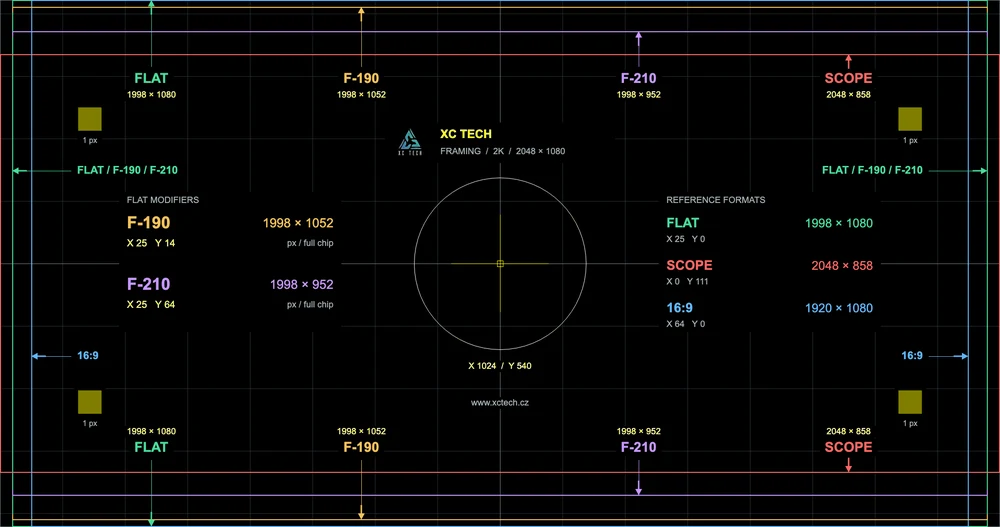
F-190 and F-210 framing lines with masking arrows and pixel offsets, plus Flat, Scope and 16:9 for reference. Full container, 20 s @ 24 fps.
Files and SHA-256
- 2K · XCT-F190-F210_TST-1_C_XX-XX_INT-TD_MOS_2K_NULL_20261008_NUL_SMPTE_OV.zip · 420 MB
SHA-256 c14cca9d62c71fbf4c44e73eb708b602db0d910fc971fa93fa48a3deb99dc366 - 4K · XCT-F190-F210_TST-1_C_XX-XX_INT-TD_MOS_4K_NULL_20261008_NUL_SMPTE_OV.zip · 493 MB
SHA-256 07533cf34c757db2053f0f7fa7971190cd27b9b258ec152c93e4f36d663c0256
What the package contains
- F-190 and F-210 framing lines
- F-190 (1998 × 1052) and F-210 (1998 × 952) inside the Flat container, 3996 × 2104 and 3996 × 1902 in 4K. Every line is labelled with its size at the top and bottom.
- Pixel offsets
- F-190 and F-210 come with their size and X/Y offset in full-chip pixels (2K: F-190 X 25 Y 14, F-210 X 25 Y 64), so the preset can be set exactly.
- Reference formats
- Flat (1998 × 1080), Scope (2048 × 858) and 16:9 (1920 × 1080) with offsets, for comparison with the usual presets.
- Masking arrows
- On the picture edges for Flat, F-190, F-210, Scope and 16:9: where the masking should land.
- Centre and 1 px targets
- A centre cross with a circle and the centre coordinate, corner targets with 1 px detail for focusing.
How to use the test
- 1
Play the package with the preset you are setting up. It is a 20 s still frame; for longer work add it to the playlist several times.
- 2
Find the line of the format you are setting up: F-190 (1998 × 1052) or F-210 (1998 × 952), 3996 × 2104 and 3996 × 1902 in 4K.
- 3
The picture edge and the masking should sit exactly on that line. The arrows on the edges show where the masking should land.
- 4
Read the preset offset straight from the chart: F-190 and F-210 show their size and X/Y offset in full-chip pixels (2K: F-190 X 25 Y 14, F-210 X 25 Y 64).
- 5
Check the result against the Flat, Scope and 16:9 reference frames.
Technical parameters
- Container
- Full 1.90:1 · 2K 2048 × 1080 · 4K 4096 × 2160
- Duration
- 20 s at 24 fps (480 frames), still frame
- Audio
- silent track in MXF
- Standard
- SMPTE DCP, unencrypted (no KDM), content kind TST
- Picture
- JPEG 2000 in MXF, X'Y'Z' 12 bit, gamma 2.6 (SMPTE ST 428-1)
- Package
- ASSETMAP, CPL, PKL, VOLINDEX and MXF in a folder ending in _SMPTE_OV, zipped
Versions
- v1.0 (2026-10-08)
- First release: F-190 (1998 × 1052) and F-210 (1998 × 952) framing lines with masking arrows, plus Flat, Scope and 16:9 for reference; 2K and 4K Full container.
All releases: GitHub Releases · Free for projector alignment, commercial use included, under the licence CC BY-ND 4.0
Frequently asked questions
When do I need F-190 or F-210 framing?
When a cinema plays content at 1.90:1 or 2.10:1 delivered in the Flat container, i.e. letterboxed. Such content gets its own preset and masking, and the chart shows exactly where the picture should start and end.
How do I read the preset settings from the chart?
The F-190 and F-210 lines show the picture size and the X and Y offset in full-chip pixels. In 2K F-190 is 1998 × 1052 with offset X 25 Y 14 and F-210 is 1998 × 952 with offset X 25 Y 64. In 4K F-190 is 3996 × 2104 (X 50 Y 28) and F-210 is 3996 × 1902 (X 50 Y 129).
How do I work out how a picture with another aspect ratio fits?
The DCP aspect ratio calculator on this site gives the picture size in the Flat, Scope and Full containers for any aspect ratio, 1.90 and 2.10 included.
More test DCPs
Something not working?